
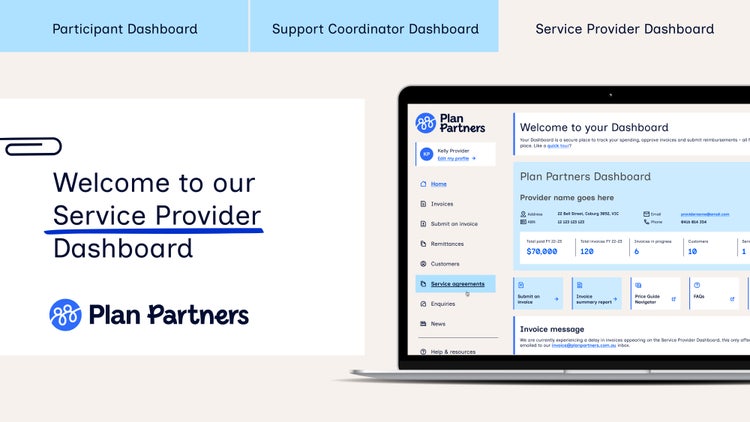
Plan Partners Service Provider Dashboard
The easy way to manage, and track your invoices submitted to Plan Partners.
Easy invoicing, fast payments and total transparency with our Dashboard
With Plan Partners Service Provider Dashboard, creating and tracking the status of all your invoices processed with us is easy. And because it’s also available as an app, you can access all these details wherever you are, 24/7.
Key features and benefits
Have access to your own Dashboard for all your customers plan managed by us.



Like a video tour of our service provider dashboard?
Show Transcript
<p><strong>[00:00]</strong> <em>Speaker (Host):</em> Enjoy easy invoicing, fast payments, and total transparency with the Plan Partners Service Provider Dashboard.</p>
<p><strong>[00:08]</strong> <em>Speaker (Host):</em> Your online dashboard makes creating invoices and tracking all your payments from Plan Partners customers easy.</p>
<p><strong>[00:15]</strong> <em>Speaker (Host):</em> We know all those payments and invoices can be tricky to track, so make it easier with the Plan Partners Service Provider Dashboard.</p>
<p><strong>[00:24]</strong> <em>Speaker (Host):</em> View all customer details in the one spot and easily switch between any Plan Partners participants assigned to you.</p>
<p><strong>[00:31]</strong> <em>Speaker (Host):</em> Get the full history of all invoices processed with us and complete visibility over every invoice for each customer.</p>
<p><strong>[00:39]</strong> <em>Speaker (Host):</em> See the total amount paid to you for the current financial year, the number of invoices still in progress and any service agreements you have in place.</p>
<p><strong>[00:48]</strong> <em>Speaker (Host):</em> You can even use the search box to filter results by customer, invoice number, date range or status.</p>
<p><strong>[00:55]</strong> <em>Speaker (Host):</em> We'll let you know exactly where each invoice is in the payment process, including when payment is expected and if there's any action required by you.</p>
<p><strong>[01:04]</strong> <em>Speaker (Host):</em> One of the most important aspects of working with the NDIS is making sure services continue with reliable payments and easy invoicing.</p>
<p><strong>[01:14]</strong> <em>Speaker (Host):</em> The dashboard gives you both submit invoices directly to plan partners quickly and easily with just a few clicks.</p>
<p><strong>[01:22]</strong> <em>Speaker (Host):</em> Or create your own invoices from ready made templates and submit them on the go.</p>
<p><strong>[01:27]</strong> <em>Speaker (Host):</em> Create and save as many templates as you like and customize them with a name and description for future use.</p>
<p><strong>[01:35]</strong> <em>Speaker (Host):</em> Access all your remittances for payments processed with us so you can reconcile your accounts whenever you need.</p>
<p><strong>[01:42]</strong> <em>Speaker (Host):</em> You also have access to our Invoice Summary report, allowing you to print or download all invoices processed with us between specific date periods, helping you navigate the end of each financial year with ease.</p>
<p><strong>[01:55]</strong> <em>Speaker (Host):</em> The dashboard is available on all major devices, including mobile, iPad and tablet, so you have 100% flexibility wherever you choose to view it.</p>
<p><strong>[02:06]</strong> <em>Speaker (Host):</em> There's so much more to the Plan Partner's Service Provider Dashboard, with helpful resources, reporting options and the latest news.</p>
<p><strong>[02:15]</strong> <em>Speaker (Host):</em> If you support a Plan Partners participant and haven't tried our online dashboard yet, now's the time.</p>
<p><strong>[02:22]</strong> <em>Speaker (Host):</em> As one of Australia's trusted plan managers, we've been helping make life easier for service providers and NDIS participants for a long time.</p>
<p><strong>[02:31]</strong> <em>Speaker (Host):</em> Enjoy easy invoicing, fast payments and total transparency with the Plan Partners Service Provider Dashboard.</p>
<p><strong>[02:39]</strong> <em>Speaker (Host):</em> Visit planpartners.com.au to log into your dashboard and download the Plan Partners app from your App Store today.</p>
Loving the ease and visibility of your Dashboard?
The more customers you have plan managed with us, the more invoices you can see in your Dashboard. We’d love for you to recommend us for Plan Management, so we can all work together as a team.

FAQs about service provider Dashboard
How do I access my dashboard for the first time?
How do I log in to my dashboard?
If you’re an existing Dashboard user, simply head to the login page on our website, enter the email address you used to create your account as your ID, and create a new password to login.
Passwords need to be a minimum of 8 characters including letters and numbers and you cannot reuse any of your last 3 passwords.
If you’re a new user, please contact us and one of our friendly Customer Service Officers will assist you.
Which internet browser should I use?
How do I submit an invoice?
You can submit an invoice in two ways:
- The first option is via your Plan Partners Dashboard, which automatically processes invoice details and checks if the information is correct. All you have to do is enter your invoice details directly in your Dashboard and click submit when you’re finished.
- You can also email us your invoice to invoice@planpartners.com.au, the choice is yours.
When will I get paid?
How do I know what line item to enter
Are my prices within the NDIA pricing arrangements?
Can I delete an invoice once it has been submitted?
Have Questions?
We realise there's a lot to think about, so feel free to get in touch if you have something you'd like to ask us.